JazzBricks
EN

JAZZ & IMPROVISATION PRACTICE

Your jazz vocabulary.
Brick by brick.

Fragments to hear, chords to explore, ideas to bring to life on your instrument.

JazzBricks connects listening, harmonic understanding and practice with backing tracks.

iPhone and iPad · internal testing underway

YOUR PRACTICE SPACE
Preview of Bricks: chord selection, backing track and notation for a musical fragment.

Preview of the development version, shown in French. Screens may change before release.

ONE APPROACH, MANY INSTRUMENTS

Guitar Keyboard Bass Wind instruments

THE APP

Three tools.
A practice that grows.

Practice a fragment, use it in a chord chart, then find a melodic thread through the changes.

ONE FRAGMENT, DIFFERENT COLORS

Hear it.
Understand it.
Make it yours.

Make a small piece of musical vocabulary familiar to your ear and ready under your fingers. Compare its colors over different chords.

  • Notes, intervals and instrument diagrams
  • Listen to the fragment and the chord
  • Swing and bossa backing tracks
Prepare your first session
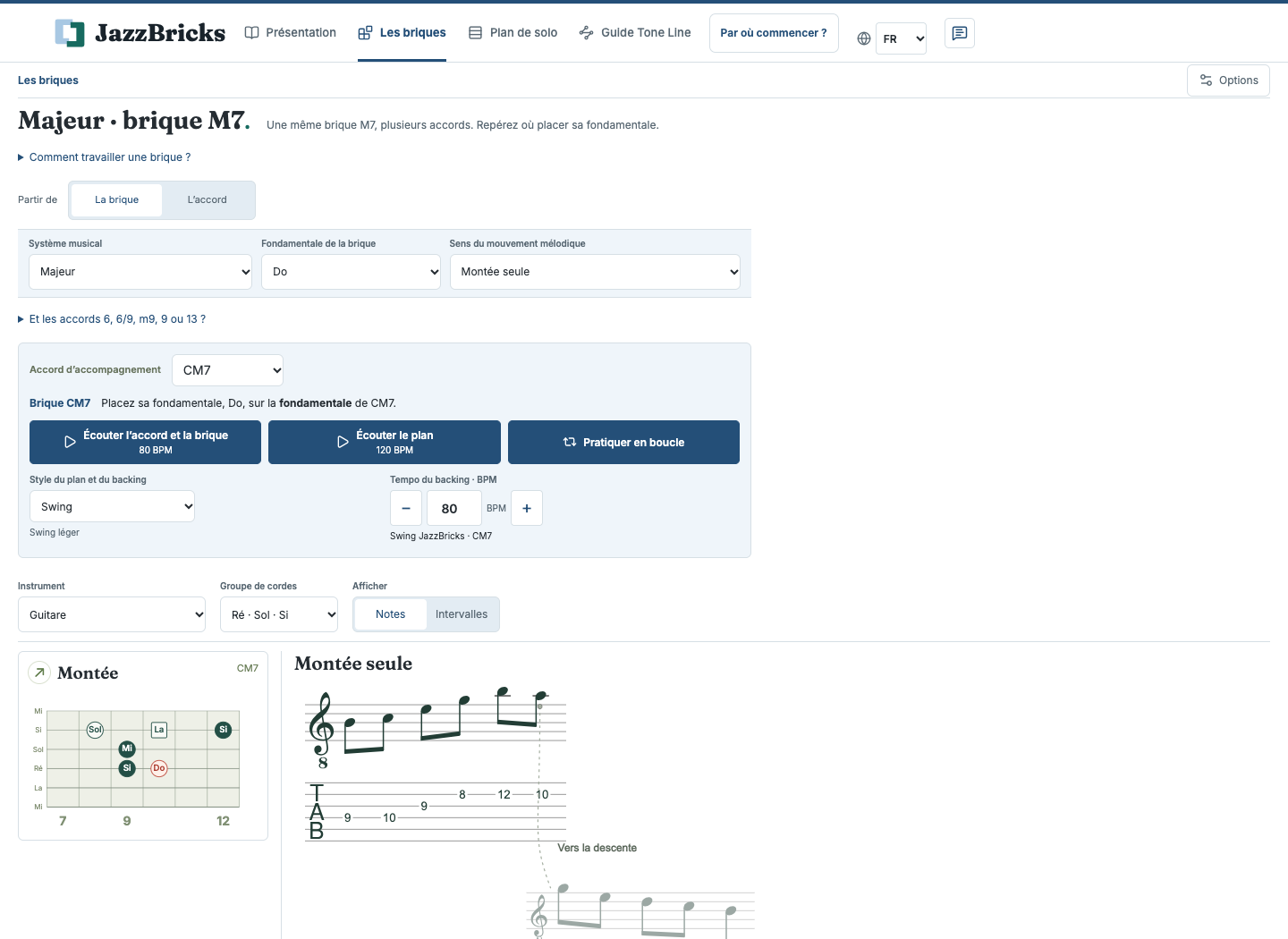
Bricks: a major fragment, chord selection and playback controls.
Bricks · development version

PUT YOUR FRAGMENTS INTO CONTEXT

Bring your ideas to life
through a chord chart.

Find your bricks over the chords of a complete chart. Anticipate the changes and put your fluency to the test with the backing track.

  • Practice charts and your own repertoire
  • Reference points through the chord changes
  • A key and tempo that suit your practice

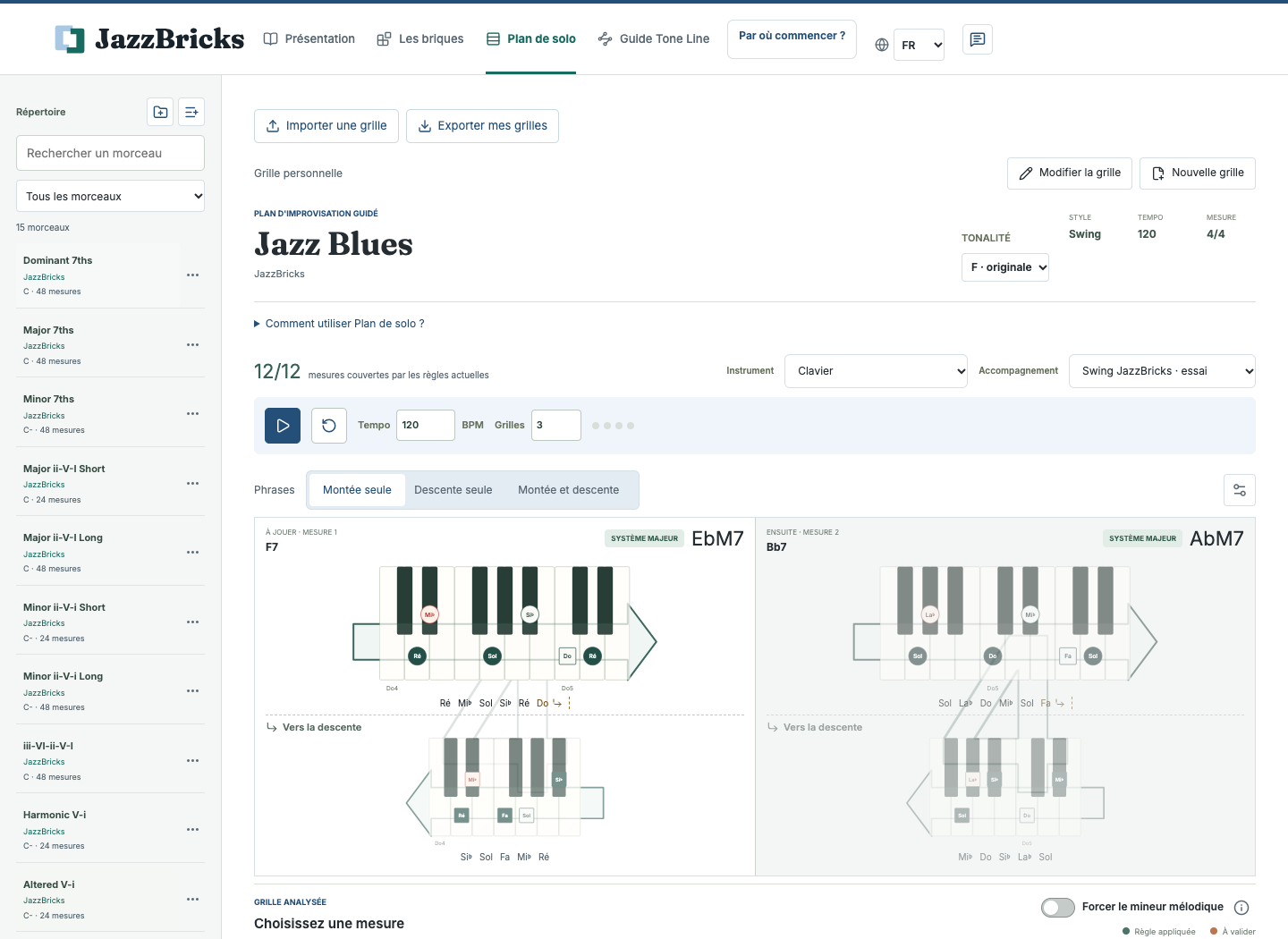
A solo map helps you prepare your choices. The rhythm, phrasing and music are yours to create.

Solo Map: a JazzBricks practice chart with suggested bricks for the chords.
Solo Map · development version

A THREAD THROUGH THE CHORDS

Give your playing
a direction.

Connect chosen notes through a chord chart. Common tones and small melodic movements become reference points for improvisation.

  • A map of melodic possibilities
  • Listen to the line with the chords
  • Explore guitar voicings

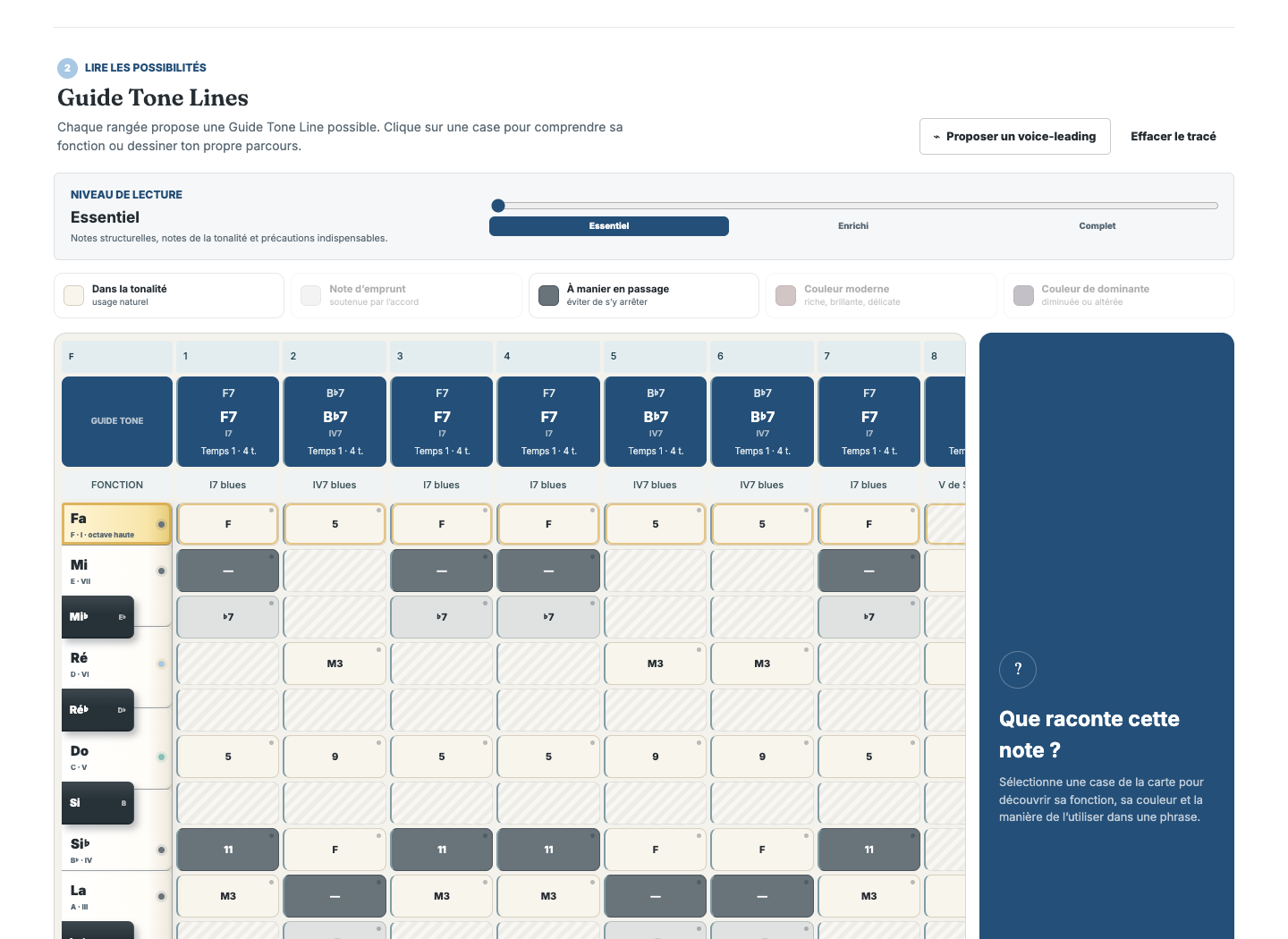
A supporting line to help you develop your own phrases.

Guide Tone Line: a harmonic map of the practice chart and possible notes through the changes.
Guide Tone Line · development version

THE APPROACH

An idea in your mind.
Music under your fingers.

A fragment becomes a reference point when you recognize its sound, understand where it fits and can find it on your instrument.

  1. 01

    Listen

    Listen to the fragment. Sing it if you can, until you recognize its shape.

  2. 02

    Find it

    Play slowly. Connect what you hear with the notes and the movement.

  3. 03

    Transform it

    Play it with the backing track. Vary your entry point, rhythm and phrasing.

Reference points for practice.
Your imagination for improvisation.

An approach developed by Yvon Demol.
JazzBricks can be used independently. The app can also support the Parler Jazz course.

PLANNED LAUNCH OFFER

Discover for free.
Unlock with one purchase.

An iPhone and iPad app with no JazzBricks account and no subscription. The public release is still in preparation.

Free discovery

Start exploring the approach and practice with the content included in the free version.

Full version

€19 in France

Planned launch price. Apple displays the local price for your country or region.

One-time purchase, no subscription: all four brick systems, all exercises and keys, chart creation and import, and full tool settings.

Purchase and restoration use Apple, on iPhone and iPad with the same Apple account. Charts and settings stay on each device. No purchase or download is offered on this website before the official link is available.

RESOURCES

Prepare your practice.
Follow JazzBricks.

Start with a guide to the approach, then follow news of the app as it develops.

PRACTICE GUIDE · GETTING STARTED

One brick,
two colors.

Hear the same fragment over two chords: a first way to explore JazzBricks.

Read the first guide

JAZZBRICKS NEWS

15 October 2026 · internal testing

iPhone and iPad.
Preparing for launch.

Version 1.0 is in internal TestFlight testing. Full access, continued offline access and purchase restoration have been tested on iPhone and iPad. The public release date and App Store link will be announced once confirmed.

Internal testing is not App Store approval. The app is not publicly available yet.

SUPPORT

A few pointers
before you begin.

Get to know JazzBricks and prepare your first practice sessions.

Contact support

Write to contact@jazzbricks.com with your device, JazzBricks version and the steps leading to the issue. A screenshot or feedback file may help if you choose to attach one.

App privacy · Website privacy

Which languages does the app offer?

The website is available in five languages. The iPhone/iPad version examined offers French and English; public-release languages will be confirmed at launch. Translating this website does not add languages to the app.

Is JazzBricks available yet?

Version 1.0 is in internal TestFlight testing on iPhone and iPad. There is no public release or App Store approval yet. The official link will be added when the app is available.

Which instruments does the app support?

The development version provides diagrams or notation for guitar, keyboard, bass, alto and tenor saxophone, trumpet, clarinet, flute and trombone. General treble-clef notation is also available. The available guidance varies by instrument; the voicings in Guide Tone Line are for guitar.

Do I need to know jazz already?

The approach starts with a short fragment to listen to and find on your instrument. Being comfortable with a few notes and chords will help you get more from it. The first guide offers a gradual way to begin.

Does JazzBricks replace lessons or a teacher?

JazzBricks provides practice support through listening, instrument diagrams and backing tracks. Your sound, listening and musical choices remain essential. The app can complement lessons and can also be used independently.

How much will the app cost?

The download will be free, with a one-time in-app purchase for the full unlock and no subscription. The planned price in France is €19. Apple will show the price applicable in your country or region before confirmation. The website takes no payments.

Can I restore my purchase on another device?

On iPhone or iPad, use the same Apple account as for the purchase. In the full-version window, choose “Restore my purchase”. A connection may be needed. Restoration restores access; it does not synchronize charts or settings.

Can I practice offline?

Sounds and tools are bundled for offline practice after installation. Continued full access offline has been tested on iPhone and iPad. Installation, purchasing or restoration may need Internet and Apple services. A file chosen from a remote provider may also need downloading.

Are my charts synchronized between devices?

No. Charts, sessions and settings stay on each device. Explicitly export and import supported files to transfer your work. iOS/iPadOS backups depend on your system settings and are separate from JazzBricks synchronization.

JAZZBRICKS · IN PREPARATION FOR iOS

Your next step?
Start with a brick.

Explore the first guide

App preview

Preview of the development version of JazzBricks, shown in French.